Quick answer: The agentic browsing score in Google Lighthouse and PageSpeed Insights isn't a grade out of 100. It's a ratio of checks passed, and a perfect score is 6 of 6: an accessibility tree an AI agent can read, a page that holds still, a valid llms.txt, a valid agent catalog, and WebMCP tools with valid schemas that cover your forms. A seventh check only lists tools and never counts. In our November 2026 study of 1,061 sites built with AI app builders, 99% were graded on only 2 or 3 of those checks, because Lighthouse skips any check whose file is missing.
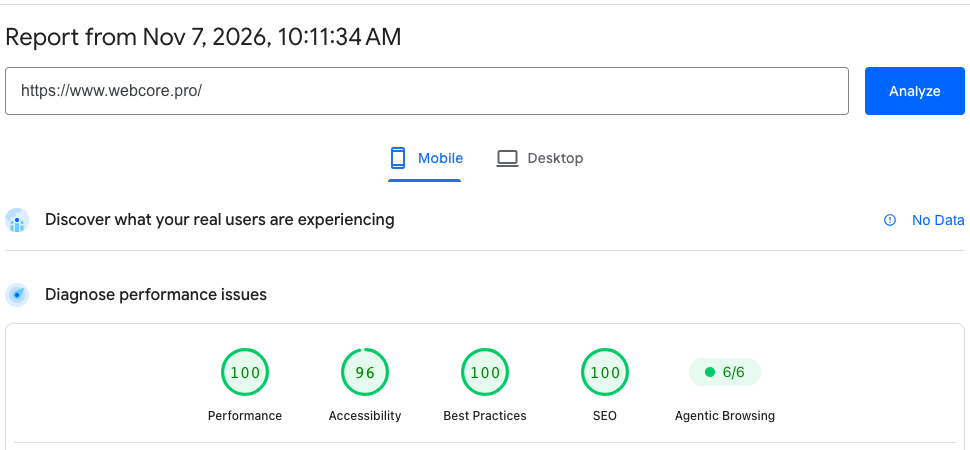
Open PageSpeed Insights on almost any website today and you'll see a new badge next to Performance, Accessibility, Best Practices and SEO. It says Agentic Browsing, and it shows a fraction: 2/2, 1/3, 3/3.
Most owners have no idea what it means. And as far as we could find, none of the guides explaining it measured more than a few sites.
So we measured. In November 2026 we ran PageSpeed Insights on 1,061 business websites built with Lovable, Base44 and v0, plus a random sample of WordPress, Wix and Squarespace sites, as part of our Vibe Coding Statistics 2026 study. 1,057 of the 1,061 came back with an agentic browsing score. Here's what those scores really say, and how to earn the top one.
What the agentic browsing score measures
AI agents are starting to use websites the way people do. They read a page, find the button that books an appointment, and fill in the form. Google's Lighthouse added the Agentic Browsing category to test how well a page is built for that kind of visitor.
Google's own documentation is clear on three points. The category is experimental and based on proposed standards. It shows a fraction of checks passed instead of a score out of 100. And its stated focus is to gather data and give developers useful signals rather than a definitive ranking.
Here are the seven checks, as Lighthouse 13.6 runs them:
| Check | What it asks | Does it count? |
|---|---|---|
| Accessibility tree | Can an agent read the page's structure, buttons and fields? | Yes |
| Layout shift | Does the page hold still while an agent clicks? | Yes |
| llms.txt | Is there a valid guide for AI at /llms.txt? | Yes, if the file exists |
| Agent catalog | Is there a valid catalog of what the site offers agents? | Yes, if the file exists |
| WebMCP tools registered | Which tools does the page offer an agent? | Never: it only lists them |
| WebMCP schemas | Is each tool described correctly? | Yes, if tools exist |
| WebMCP form coverage | Can an agent use the page's forms as tools? | Yes, if tools exist |
That's why 6 of 6 is the top score. There is no 7 of 7, because the registered-tools check is informational and never counts toward the fraction.
Why most sites show 2/2 or 3/3
Here's the part most guides miss. When the thing a check looks for doesn't exist, Lighthouse doesn't fail the site. It sets that check aside.
If a site has no llms.txt, that check sits out. The same happens when there's no agent catalog, and with no WebMCP tools, three more checks sit out. What's left is usually just two: the accessibility tree and layout shift.
Our numbers show how common that is:
- 99% of the 1,057 AI-built sites with a result were graded on only 2 or 3 of the checks.
- 92% of the 187 WordPress, Wix and Squarespace sites were graded on only 2 or 3.
- 48% of the AI-built sites showed a perfect score anyway, while offering an agent almost nothing.
- 1 site out of 1,284 was graded on all six countable checks. It was webcore.pro, our own.
So a 2/2 isn't a perfect score in any useful sense. It means the page passed the only two checks it was given. A real 6 of 6 means every check applied, and every one passed.
The check most sites fail: the accessibility tree
The accessibility tree is the map of a page that screen readers use, and AI agents use it the same way. Google's documentation calls it a core part of agentic navigation, and it was the check that failed most often.
619 of the 1,271 sites we measured failed it, about half. Traditional sites did worse than AI-built ones here: 77% of the WordPress sites failed it, against 34% of the Lovable sites.
Google's documentation names what the check looks for, and the usual failures follow from it:
- Every interactive element needs a name. An icon-only button, such as a hamburger menu or a phone icon, with no text label is invisible to an agent.
- Nothing hidden may stay interactive. A carousel's hidden arrow buttons that can still be reached with the keyboard break this rule. It's a failure we see often on small business sites.
- Roles and structure must be valid. Lists built from the wrong elements, or a page with no main landmark, make the tree harder to read.
The fixes are small. A label on each icon button, hidden controls that are truly hidden, and plain semantic HTML get most sites through.
How to pass all six checks
1. Accessibility tree
Give every button, link and form field a programmatic name, remove anything focusable from hidden sections, and use real HTML elements for lists, headings and the main content. Then run PageSpeed Insights again and open the check's details: it names the exact elements that failed.
2. Layout shift
Keep cumulative layout shift low, under 0.1, the mark web.dev calls good. Give every image and embed its width and height, load fonts so text doesn't jump, and never push content down with a late banner. Most sites already pass this one: only 48 of 528 Lovable sites failed it.
3. llms.txt
Put a plain Markdown file at the root of your domain, /llms.txt. Start it with your business name as a heading, then a short summary of what you do and where, then links to your most important pages. Write it like a briefing for a new employee.
One warning from our data: a broken file is worse than no file. A missing llms.txt sits out, but a file Lighthouse can't read fails. 35 of the sites we measured, two of them ours, had an llms.txt that failed the check.
4. Agent catalog
The agent catalog is a JSON file at /.well-known/ard.json that describes what your site offers agents, and Lighthouse checks it against the catalog's schema.
The trap is your server's answer to that address when the file doesn't exist. Many sites answer every unknown address with their home page, so a request for /.well-known/ard.json gets a web page back, and the check fails. It should get a 404. That's exactly how our own sites failed it, which we cover below. Outside our own sites, 25 of the ones we measured failed this check.
5 and 6. WebMCP schemas and form coverage
WebMCP lets a page tell an agent, in a structured way, which actions it offers: book an appointment, request a quote, send a message. Tools can be declared in the page's HTML or registered with JavaScript, and Lighthouse checks that each tool is described correctly and that your forms are covered.
WebMCP is still an experiment. Testing it needs Chrome 150 or later, and the WebMCP checks need the site to be registered for Google's WebMCP origin trial. In our study, only two sites registered any tools, one built with Base44 and webcore.pro, which is why those checks sat out almost everywhere.
What happened when we tested our own sites
We hold ourselves to the same test. On November 5, 2026, our study measured the 13 sites built on WebCore along with everyone else, and the result was humbling: only 1 of the 13 passed every check it was graded on.
The cause was one detail. When a visitor asked for /.well-known/ard.json on a site that had no catalog, our platform answered with the site's home page and a "found" status. Lighthouse read that page as a broken catalog and failed the check on 11 of the 13 sites.
We changed the platform the same day, so every site now answers unknown /.well-known addresses with a 404, and republished all 13. On November 6 we measured them again with the same scripts:
| WebCore's 13 sites | November 5 | November 6 |
|---|---|---|
| Pass every scored check | 1 of 13 | 7 of 13 |
| Median agentic browsing score | 67% | 100% |
Seven of 13 is better, and it isn't 13 of 13 yet. The ones still short fail the accessibility tree, and that's the next thing we're fixing.
How to check your own agentic browsing score
Open PageSpeed Insights, enter your address and choose Mobile. The Agentic Browsing badge sits next to the four familiar scores. Click it to see which checks ran, which passed, and which sat out.
Run it two or three times before you act. Google's documentation notes that results can move between runs, because of how a site registers its tools, changes in the accessibility tree, and layout shifts.
Then read the fraction for what it is. A 2/2 means two checks applied and both passed. To get to a real 6 of 6, add the files that bring the other checks into play, and make each one pass.
Frequently Asked Questions
Q: What is a good agentic browsing score?
The top score is 6 of 6, with every check applied and passed. A 2/2 or 3/3 means only two or three checks applied, which was true for 99% of the 1,057 AI-built sites we measured.
Q: Why does my agentic browsing score say 2/2?
Lighthouse only counted two checks, usually the accessibility tree and layout shift, because your site has no llms.txt, no agent catalog and no WebMCP tools. Those checks sit out instead of failing.
Q: Is a 7 out of 7 agentic browsing score possible?
No, because one of the seven checks, WebMCP tools registered, only lists the tools a page offers and never counts. So 6 of 6 is the highest result Lighthouse gives.
Q: Does the agentic browsing score affect Google rankings?
Google describes the category as experimental, with a focus on gathering data and giving useful signals rather than a definitive ranking. Treat it as readiness for AI agents, not as a ranking boost.
Q: What is llms.txt?
A plain Markdown file at the root of your domain that tells AI assistants what your business does and where to find your key pages. Lighthouse checks that it exists and can be read.
Q: What is WebMCP?
A proposed standard that lets a web page tell AI agents which actions it offers, such as booking or requesting a quote. It's an experiment that needs Chrome 150 or later and Google's origin trial.
Q: Why did my agentic browsing score change between runs?
Google's documentation names three causes: when a site's tools register, changes in the page's accessibility tree, and layout shifts from ads, images or injected content.
Q: How did you measure 1,061 sites?
One PageSpeed Insights run on a simulated phone for each site, on November 5 and 6, 2026, with the agentic browsing category included. The full method and results are in our Vibe Coding Statistics 2026 study.